
headless 執行與 CI
在介面裡建構好的情境,可以從命令列以無視窗的方式執行。這條路徑能把您的 API 測試變成管線中的一個步驟。
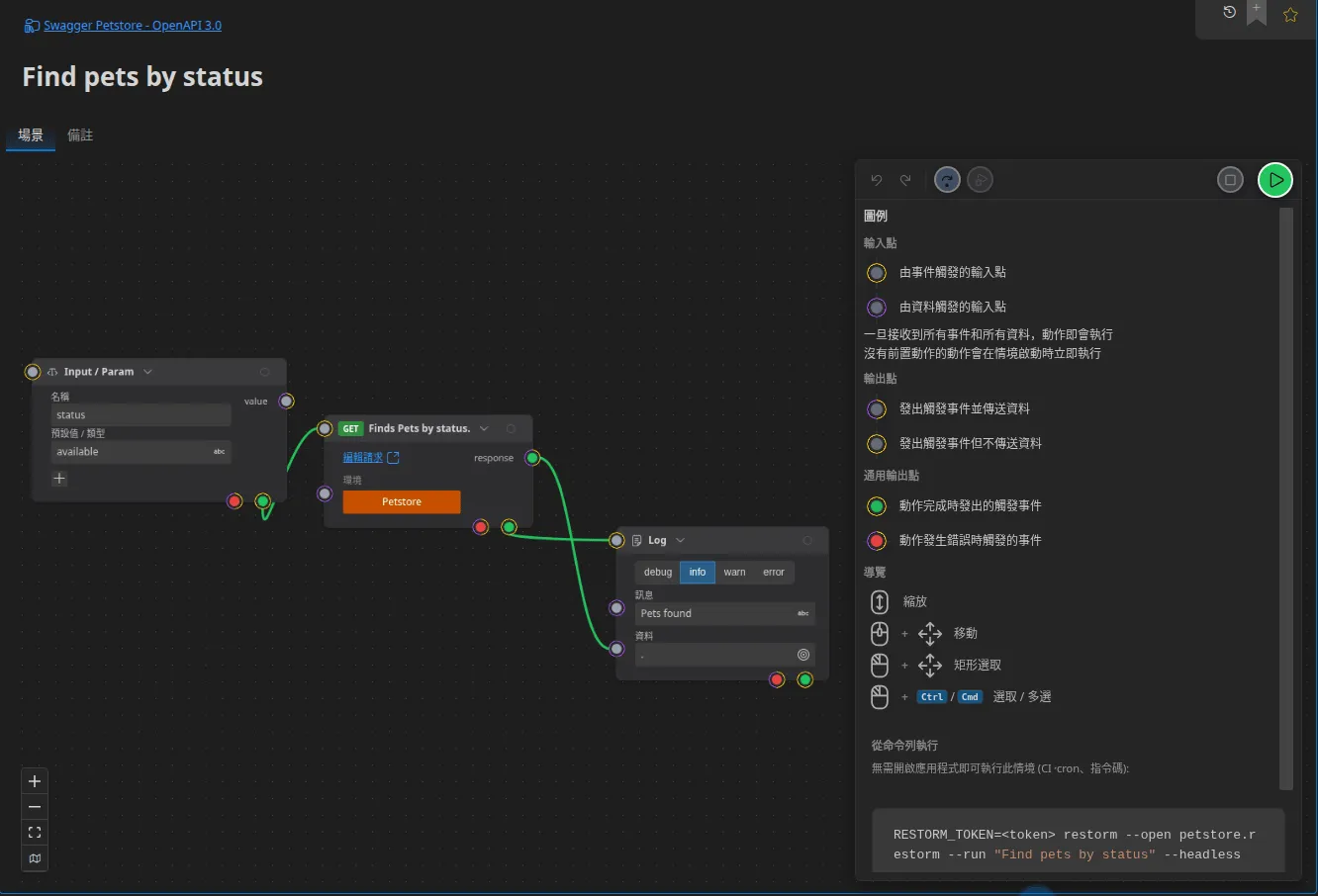
restorm \ --open ./projet.restorm \ --run "Find pets by status" \ --headless \ --param status=available| 引數 | 用途 |
|---|---|
--open <path>, -o | 要開啟的專案。與 --run 併用時為必填 |
--run <target> | 要執行的情境。只要出現它,就會啟用命令列模式 |
--by <name|id> | --run 以什麼方式指定情境:以名稱(預設)或以識別碼 |
--headless | 完全不顯示視窗。不加它時,視窗會顯示出來,同時記錄在主控台上滾動 |
--param name=value | 提供給情境輸入參數(一個 Input / Param 方塊)的值。可重複 |
--all-logs | 一併納入引擎本身的項目;預設只輸出 Log 動作產生的項目 |
--out <file> | 同時把記錄逐步寫入一個檔案 |
--clear-settings, -cls | 啟動前重設所有偏好設定 |
格式錯誤的 --param(少了 =)會被回報到錯誤輸出並忽略。name=(空值)是可以
接受的。
這些值會依參數宣告的型別轉換 — 請參閱 情境中的變數與資料。
| 代碼 | 意義 |
|---|---|
0 | 情境正常結束 |
1 | 失敗、被取消,或引擎發生錯誤 |
2 | 找不到目標、--out 指定的檔案無法存取,或使用了 --run 卻沒有 --open |
3 | 權限被拒:RESTORM_TOKEN 缺失、無效或已撤銷、方案等級不足,或驗證端點無法連線 |
正是這套約定讓結果能被 CI runner 直接使用。
記錄會寫到標準輸出,一筆一筆地,一產生就寫出,形式是一段 YAML 序列:
- message: "🔵 [2026-07-29 10:30:00.123] Commande créée" data: { id: 4271 }各層級前面都帶一個色點:⚪ debug、🔵 info、🟠 warn、🔴 error。每一行都
不會被切斷 — 輸出始終可以用 grep 處理。錯誤會走標準錯誤輸出。
這正是介面上「複製記錄」按鈕產生的文字:兩邊格式完全相同。
CI 中的密鑰
Section titled “CI 中的密鑰”請使用環境變數這種密鑰來源:密鑰由您 CI 的保險庫注入,Restorm 只負責讀取, 專案裡不會寫入任何東西。請參閱密鑰。
在 runner 上安裝 Restorm
Section titled “在 runner 上安裝 Restorm”- 透過 npm —— 先執行
npm i -g restorm-cli@<版本>,再輸入restorm …。官方建置只下載一次,通過已公布的總和檢查碼驗證後存入快取,同一台機器上後續的工作不再下載任何內容。npm 套件的版本號就是它啟動的 Restorm 版本:固定其一即固定其二。 - 透過系統套件(
.deb、.rpm),如下方範例所示 —— 若您自行建置 runner 映像檔,這是更好的選擇,因為工作將完全不需要下載。
官方 GitHub Action
Section titled “官方 GitHub Action”在 GitHub 上,Monsieur-Dev/restorm-action 把本頁描述的一切濃縮成一個步驟:透過 restorm-cli 安裝 Restorm(一次經總和檢查碼驗證的下載,工作之間快取重用),用 xvfb 包裝,無介面執行您的情境,並把每個結束代碼翻譯成具名的工作錯誤。
- uses: Monsieur-Dev/restorm-action@v1 with: project: ./api.restorm scenario: Smoke tests params: | status=available env: RESTORM_TOKEN: ${{ secrets.RESTORM_TOKEN }}Action 的標籤固定 Restorm 版本(@v1.2.3 執行 Restorm 1.2.3),也可以傳入明確的 version: 輸入。所有輸入都記載於儲存庫的 README。想要完全掌控的話,下方的手動配方仍然可用。
GitHub Actions
Section titled “GitHub Actions”name: Tests d'APIon: [push]
jobs: api: runs-on: ubuntu-latest steps: - uses: actions/checkout@v4
- name: Installer Restorm env: RESTORM_VERSION: '1.4.2' # 您想要固定的版本 run: | curl -sSL -o restorm.deb \ "https://dl.restorm.app/restorm_${RESTORM_VERSION}_amd64.deb" sudo apt-get install -y ./restorm.deb
- name: Exécuter les tests de fumée env: RESTORM_TOKEN: ${{ secrets.RESTORM_TOKEN }} API_TOKEN: ${{ secrets.API_TOKEN }} run: | xvfb-run -a restorm \ --open ./api.restorm \ --run "Find pets by status" \ --headless \ --all-logs \ --out run.log \ --param status=available
- name: Publier le journal if: always() uses: actions/upload-artifact@v4 with: name: journal-restorm path: run.logGitLab CI
Section titled “GitLab CI”tests-api: image: ubuntu:24.04 variables: RESTORM_TOKEN: $RESTORM_TOKEN RESTORM_VERSION: '1.4.2' # 您想要固定的版本 before_script: - apt-get update && apt-get install -y curl xvfb - curl -sSL -o restorm.deb "https://dl.restorm.app/restorm_${RESTORM_VERSION}_amd64.deb" - apt-get install -y ./restorm.deb script: - > xvfb-run -a restorm --open ./api.restorm --run "Find pets by status" --headless --all-logs --out run.log --param status=$PET_STATUS artifacts: when: always paths: [run.log]headless 模式下有什麼不同
Section titled “headless 模式下有什麼不同”- Toast 動作什麼都不做;執行會照常繼續。
- 參數無法以互動方式詢問:請用
--param全部提供,或讓它們採用各自的預設值。 - 不論設定成什麼,MCP 伺服器在沒有顯示環境的機器上 永遠不會啟動。
RESTORM_TOKEN 權杖(前綴為 rstk_)可以從您帳號的儀表板產生。它繫結在組織
上,而不是繫結在某個人身上:這就是要放進 CI 保險庫的那個權杖。請參閱
帳號與登入。