
Cookie jar
Restorm keeps a real cookie jar per environment. A response’s Set-Cookie
is captured, honouring Domain / Path / Expires / Max-Age / Secure /
HttpOnly / SameSite, and re-sent as a Cookie header on the next matching
request — so a login → protected-route sequence just works, without you
copying a token by hand.
Per environment, never per request
Section titled “Per environment, never per request”The jar is keyed by the active environment, not by the request. Switching the environment switches the cookie context, and two environments pointing at the same host never share cookies. A scenario node uses the same environment jar as the interactive editor, so a login step and a later protected call share their cookies within the run.
The Cookie jar tab
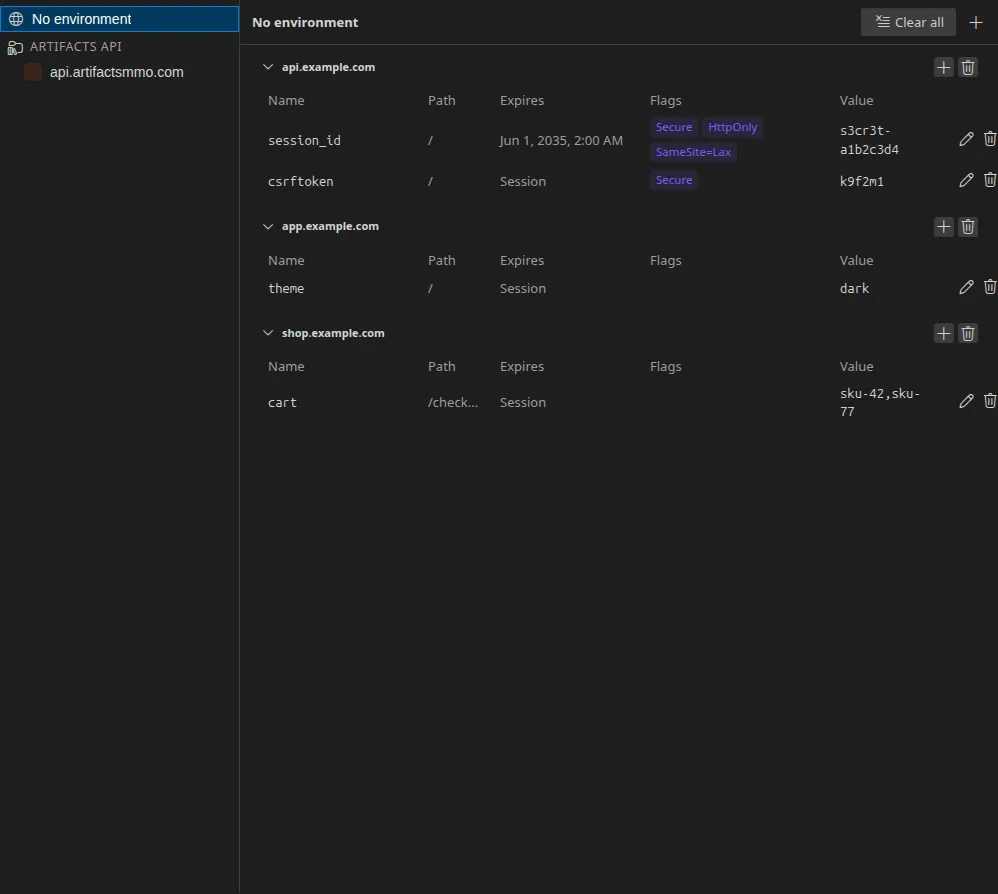
Section titled “The Cookie jar tab”Open it from View ▸ Cookie jar. It is a single workbench tab (like the console or the firewall) showing every cookie of the project:
- the environment tree on the left (the “No environment” jar first, then each environment with its own icon);
- on the right, the selected environment’s cookies grouped by domain in collapsible panes, each row showing name, path, expiry, attributes and value.
From there you can add a cookie by hand (the + on a domain pane pre-fills
that domain), edit one in a modal, delete one, clear a whole domain
or the whole jar. Destructive actions ask for confirmation. The tab refreshes
live: run a request that sets a cookie and it appears at once.
The per-request Cookies tab
Section titled “The per-request Cookies tab”Every HTTP-based request (HTTP, OData, GraphQL, SOAP, tRPC, JSON-RPC, SSE, WebSocket) gains a Cookies tab next to Response and Info, scoped to the selected environment and this request. It lists the cookies sent with the request and the cookies received in the response — including cookies set on a redirect, which never reach the final response headers. The tab is available both live and on a past response from the request’s history.
Persistence
Section titled “Persistence”Cookies are stored per project under your user data directory. Persistent
cookies (those with an Expires) are saved and reloaded when you reopen the
project, the way a browser keeps them; session cookies (no Expires) live
only in memory and are dropped when the app restarts.
Driving it from MCP
Section titled “Driving it from MCP”An AI agent can read and mutate the jar through the MCP tools list_cookies,
add_cookie, remove_cookie, clear_cookie_domain and clear_cookies, each
keyed by environment. These are Pro / Enterprise tools.