
Firewall
Restorm intercepts all of its outbound calls — yours as well as its dependencies’ — and blocks by default anything it does not know about.
The benefit is direct: a third-party library phoning home cannot do so without your seeing it.
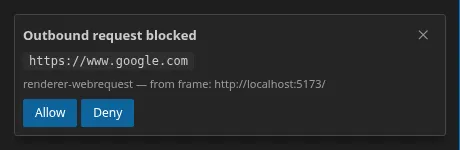
How the verdict is reached
Section titled “How the verdict is reached”In this order:
- Restorm’s internal infrastructure ports on the loopback interface are allowed.
- The whitelist allows.
- Origins derived from your project allow — that is, the URLs of your
requests, after
{{variable}}substitution across every environment, recomputed whenever the tree changes. - The blacklist refuses.
- Otherwise, an authorisation prompt is shown.
Point 3 is what makes the firewall livable: importing a three-hundred-operation specification does not trigger three hundred prompts, since all those URLs come from your project.
The authorisation prompt
Section titled “The authorisation prompt”It shows:
- the origin concerned, in the form
https://exemple.com:443; - the layer that intercepted the call;
- a hint about the caller — the initiating URL, or a stack trace naming the npm package or the file responsible;
- two buttons, Allow and Deny.
Every decision is persisted in the matching list.
With no window available, or after 60 seconds with no answer, the call is refused automatically.
The panel
Section titled “The panel”View ▸ Firewall opens a single tab: two lists, Whitelist (N) and
Blacklist (N), with their live counters, one row per rule and its bin icon,
plus an add field in scheme://host:port form.
A Test outbound to google.com button lets you check the mechanism works.
The rules
Section titled “The rules”A rule is a scheme + host + port triplet. All three are significant: http is
not https, and :443 is not :8443.
Adding an origin to one list automatically removes it from the other.
Two wildcards are accepted:
| Form | Effect |
|---|---|
https://api.exemple.com:* | Every port on that host |
https://*.exemple.com | Subdomains one level deep only |
https://*.exemple.com covers neither bare exemple.com nor a.b.exemple.com.
Special cases
Section titled “Special cases”- Automatic update calls are exempt: they raise no prompt.
- Worker threads and child processes are denied all HTTP traffic, with no possibility of a prompt or of a whitelist override. A deliberately defensive posture.
- There is no master switch for disabling the firewall. That is deliberate.
The console
Section titled “The console”Every intercepted call appears in the console, with its verdict, as a copyable shell command.
Over MCP
Section titled “Over MCP”Six tools, all in the Community edition: open_firewall, firewall_list_rules,
firewall_allow, firewall_deny, firewall_list_pending_prompts and
firewall_resolve_prompt. Any change made by an agent is audited. See
MCP tools.