
Updating from the source
An API specification is a living thing. Re-importing and overwriting everything would lose your adjustments; re-importing alongside would produce a duplicate. Restorm does the third thing: it computes the delta.
How it works
Section titled “How it works”Every successful import records a fingerprint of the source on the environment folder it created. The folder’s Refresh button fetches the source, compares the fingerprints and applies the differences rather than starting over:
- new operations are added, in the place a fresh import would have put them;
- modified operations have their parameters completed with whatever the specification adds;
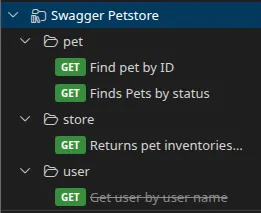
- operations the specification marks as deprecated are flagged and appear dimmed in the tree;
- operations that have vanished from the source are flagged as removed and appear struck through — they remain runnable and are never deleted;
- your edits are kept: name, method, URL and the values you typed are never overwritten.
The principle: the specification has authority over what it describes, you have authority over the rest.
The full walkthrough — where the button is, what the wizard shows you before applying, what happens to the documentation — is described in Accessing and updating an imported API’s documentation.
Re-syncable formats
Section titled “Re-syncable formats”Twelve formats are concerned:
- OpenAPI 3.x
- Swagger 2.0 (the same page as the previous one, but counted separately here: the two have their own re-sync logic)
- GraphQL (SDL)
- gRPC —
.protofile and server reflection - SOAP / WSDL
- OData
- AsyncAPI
- Postman
- Insomnia
- Bruno
- OpenRPC
- Smithy
Non-re-syncable formats
Section titled “Non-re-syncable formats”HAR, cURL, PowerShell, REST Client, Thunder Client, Paw, HTTPie, RAML, WADL, Thrift, TypeSpec, API Blueprint, tRPC.
For those, a new import creates a new tree: it is up to you to reconcile the two, or to import into a dedicated folder.
Special case: gRPC by reflection
Section titled “Special case: gRPC by reflection”A gRPC request imported by reflection carries a Refresh from reflection button right on its tab: that is the shortest route when a service changes during development.