
Installation
Restorm is downloaded from restorm.app/download. No account is required to install and use the Community edition.
Available packages
Section titled “Available packages”| Platform | Format | Notes |
|---|---|---|
| Windows | .exe installer (NSIS) | Per-user or per-machine installation |
| macOS | .dmg and .zip | Shipped for arm64 (Apple Silicon) and x64 (Intel) |
| Linux | AppImage | Nothing to install: make the file executable and run it |
| Linux | .deb | Debian, Ubuntu and derivatives (sudo apt install ./restorm_*.deb) |
| Linux | .rpm | Fedora, RHEL, openSUSE (sudo dnf install ./restorm-*.rpm) |
On Linux, the .deb and .rpm packages declare a Restorm menu entry
(subtitled API Testing Environment) under the Development category, and
register the application with your desktop’s software manager.
First launch
Section titled “First launch”On first launch, Restorm opens the welcome screen: import cards, recent projects, and a series of tips. From there you can:
- create an empty project (
Ctrl+N); - open an existing project (
Ctrl+O); - import an API (
Ctrl+I) from a file or a URL — this is the fastest route: see Import & export.
Automatic updates
Section titled “Automatic updates”Restorm checks for a new version at startup and then every four hours, and downloads the update in the background. It is installed the next time you close the application; an “Update ready” notification offers to restart straight away.
After an update, the first launch shows the “What’s new in version X” screen, built from the release notes bundled with the application.
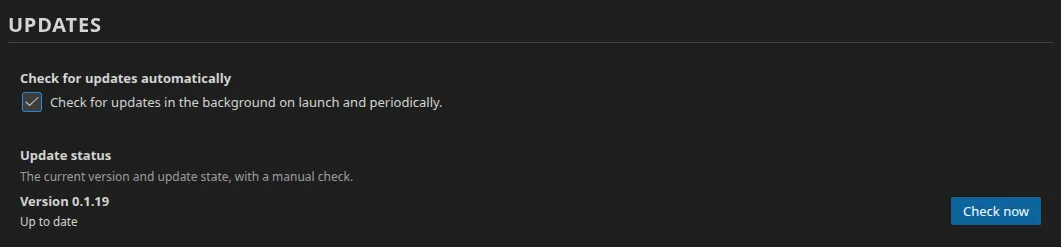
You can control all of this in Settings ▸ Updates:
- Check for updates automatically (enabled by default);
- Update status, which shows the current version and a Check now button.
Automatic update calls are exempt from the firewall: they never trigger an authorisation prompt.