
Built-in git
A Restorm project is meant to live in a git repository. The integration goes
further than a plain git commit: it understands the format and can resolve a
conflict at the level of business entities, not of YAML lines.
Getting going
Section titled “Getting going”There is nothing to configure. As soon as the open .restorm file sits inside a
git repository, the git surfaces come alive.
Restorm uses your local git: no credentials to type, no token management
inside the application. The rule is simple — if git push works in your terminal,
it works in Restorm. Git is launched with prompts disabled: a repository that would
ask for a password fails immediately with git’s own message, rather than blocking
the interface.
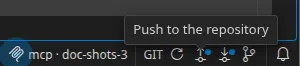
The status bar’s GIT cell
Section titled “The status bar’s GIT cell”Two buttons, Push and Pull, each carrying a badge (a dot, never a number) when there is something to send or a newer version to fetch.
The title bar’s Git menu offers the same actions, plus Refresh, Reset to the server’s version and History.
Pushing
Section titled “Pushing”The push modal shows a commit message already written for you, generated deterministically from the structural diff — with no language model involved. One line per modified entity (request, scenario, folder, environment folder), never one line per field.
- A message language picker, independent of the interface’s language, with a switch to make it the default.
- An editable title, with an advisory counter at 72 characters.
- A multi-line body.
Confirming runs the sequence: save, git add, commit, push.
Pulling
Section titled “Pulling”Restorm saves first, then fetches and merges.
Clean merge: the tree and the open tabs refresh in place.
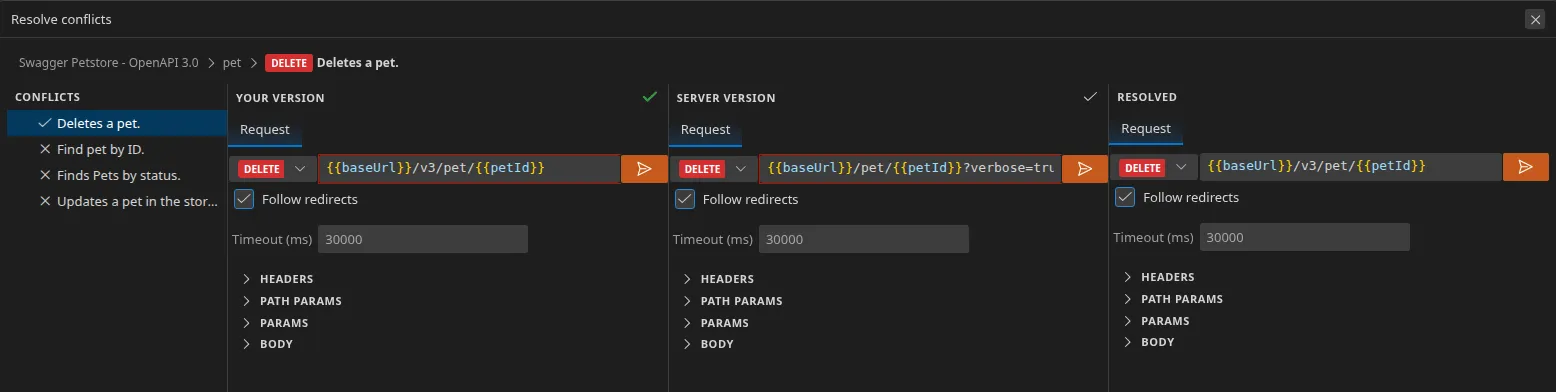
Conflict: a four-pane resolution view opens.
| Pane | Content |
|---|---|
| Conflict list | The entities in conflict |
| Your version | Read-only |
| Their version | Read-only |
| Resolved | Editable — this is what will be written |
The important part: each pane shows the entity in its genuine editor — an HTTP
request in the HTTP editor, a scenario in the scenario editor. You are not resolving
<<<<<<< markers in YAML, you are comparing two requests.
There is a “use this version” button per side, and the fields that diverge are highlighted in red — when only one field differs, the pane opens straight onto the relevant tab.
An environment folder’s API documentation resolves automatically (the more recent version wins).
Cancel runs a git merge --abort. Closing the application mid-resolution means
that, on the next launch, you are offered the chance to abandon the merge.
Background checking (semi-pull)
Section titled “Background checking (semi-pull)”Restorm periodically checks whether a newer version exists — without ever merging
on its own. Three triggers: an observed change in .git, opening a file, and a
timer whose frequency is set in Settings ▸ Git (Off, 15 min, 30 min, 1 h, 4 h,
12 h, 24 h).
An “Update available” notification then offers Pull now.
The file changed outside Restorm
Section titled “The file changed outside Restorm”If the file has changed on disk since it was opened, saving is refused and Restorm asks you to Reload or to Keep your version.
Why the diffs are readable
Section titled “Why the diffs are readable”Two properties of the format, described in
.restorm projects and files: a
canonical key order, and stably derived identifiers.
The consequence: opening and re-saving without changing anything produces no diff at all, and two people adding the same request in the same place produce entities the merge knows how to pair up.
History
Section titled “History”Git ▸ History opens a two-pane view: the commit list with a branch gutter, and the detail on the right. A commit’s context menu lets you retrieve that version.
Over MCP
Section titled “Over MCP”Four tools, in the Pro edition: git_commit_push (step 1 of 2 — returns a review
token, the title, the body and the per-entity diff, writing nothing),
git_confirm_push (step 2 of 2 — refused if the project has changed since the
review), git_pull and git_resolve_conflicts.
The split into two steps is deliberate: an agent cannot push without a diff having been presented first.