
Running and debugging a scenario
Launching
Section titled “Launching”The editor’s play button. It is disabled as long as validation errors remain.
If the scenario declares parameters with no value, Restorm asks for them at the moment the run reaches them.
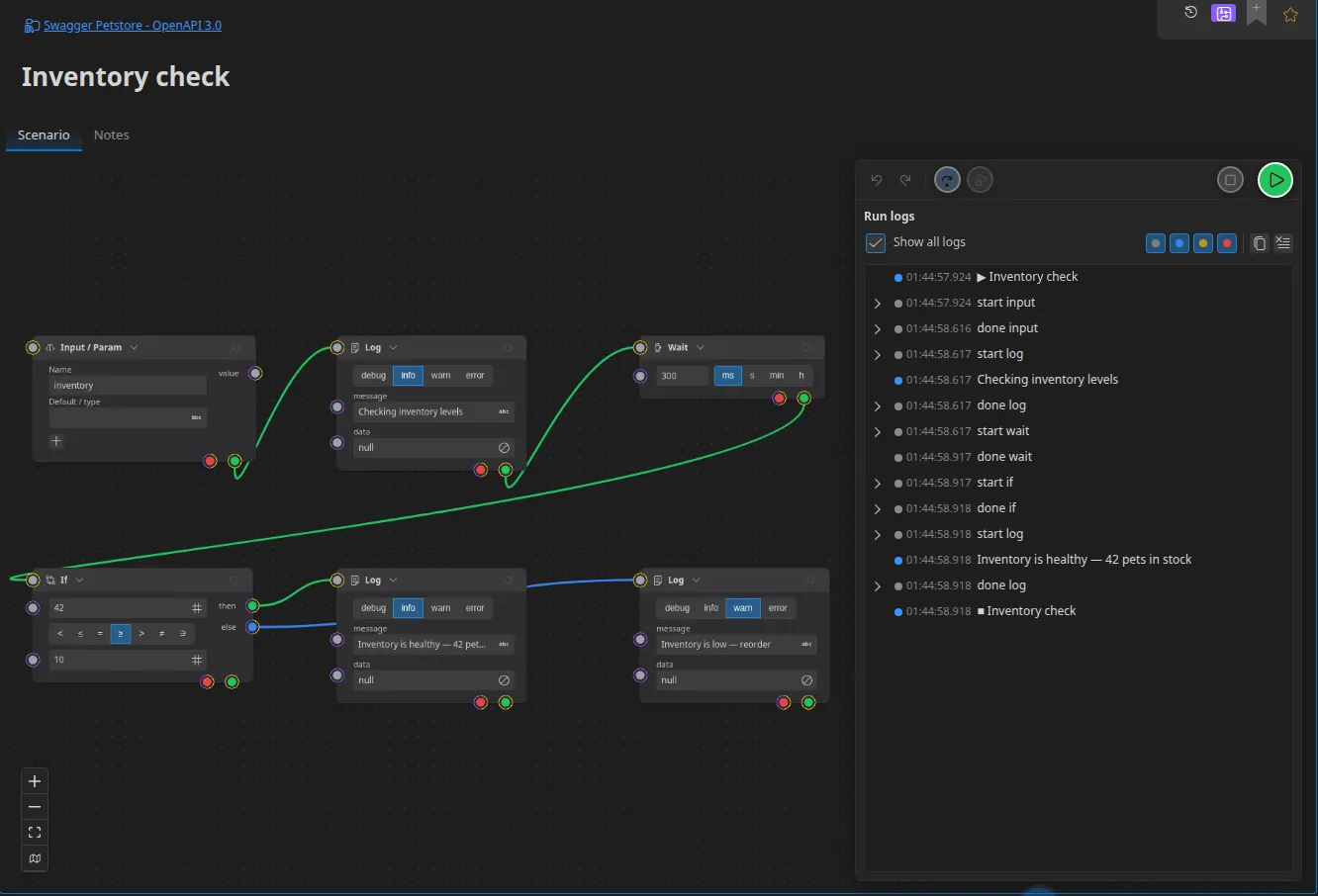
Following the run
Section titled “Following the run”The execution log fills up as it goes. Each entry carries a level (debug,
info, warn, error), a millisecond timestamp, a message, and possibly
structured data.
Two levels of detail:
- by default, only your own entries — those produced by the Log action — are shown;
- the full display adds the engine’s entries: the start and end of every box, the values travelling along the links, the errors.
The log’s copy button produces exactly the same text as the command line’s output: what you paste into a ticket is identical to what CI will produce.
Run history
Section titled “Run history”Runs are archived next to the project, in the same file as the response history. By default: the last 50 runs, 2,000 log entries per run, with a lifetime of 30 minutes.
Stopping
Section titled “Stopping”The stop button interrupts the run. Waits in progress (Wait, Wait until, Timer) are interrupted cleanly, open connections are closed and code actions in progress are abandoned.
Running a single box
Section titled “Running a single box”Request-type boxes can be run in isolation, without launching the whole scenario: that is the quick way to check a call really goes out before wiring up the rest.
Debugging
Section titled “Debugging”The log as your first reflex
Section titled “The log as your first reflex”Add Log actions at strategic places: it is the graph’s console.log, and it
is what you will find again in CI.
Notifications
Section titled “Notifications”The Toast action shows a message in the interface. Useful while building — no effect in headless mode, where the run carries on as normal.
The step-by-step inspector
Section titled “The step-by-step inspector”The Pro edition gives access to step-by-step debugging: breakpoints on boxes, controlled progress, inspection of the values in transit. See Plans and capabilities.
Errors
Section titled “Errors”Every box (except Output, Now and Retry) has an error port. A box
that fails without its error being wired fails the run.
Two useful patterns:
- Retry — wraps an error boundary: downstream failures are caught and
retried according to the configured strategy (fixed, linear, exponential), with
an
exhaustedoutput when the attempts are used up. - Throw — fails deliberately, with a message. That is what you need in order to fail a CI job on a business condition.
Driving over MCP
Section titled “Driving over MCP”An AI agent can launch and monitor a scenario (Pro edition): run_scenario (with
params, interactive, blocking), get_scenario_run_status (which returns the
log, the pending input requests and the tree of sub-runs), list_scenario_runs,
stop_scenario_run and answer_scenario_input. See
MCP tools.