
Detecting problems in an imported API
When you import an API (OpenAPI, Swagger, and the other supported formats), Restorm keeps the API’s structured documentation on its environment folder. Right after the import — and every time you reopen the file — Restorm quietly projects that documentation into a design and runs the same validation the API designer applies, entirely in the background. It never blocks the import and never touches what you are doing.
If it finds nothing, you see nothing. If it finds structural problems, it points you at them in two places.
The ”!” in the sidebar
Section titled “The ”!” in the sidebar”The environment folder that carries the flagged API shows a small ”!” on the right of its row. It is the at-a-glance signal that this API’s design has something worth a look — and it disappears on its own once the API is clean again (after a re-import or an API update that fixes it).
The “Issues” tab
Section titled “The “Issues” tab”Open the environment folder and it gains an Issues tab. The tab only appears when problems were detected — a clean API never shows it.
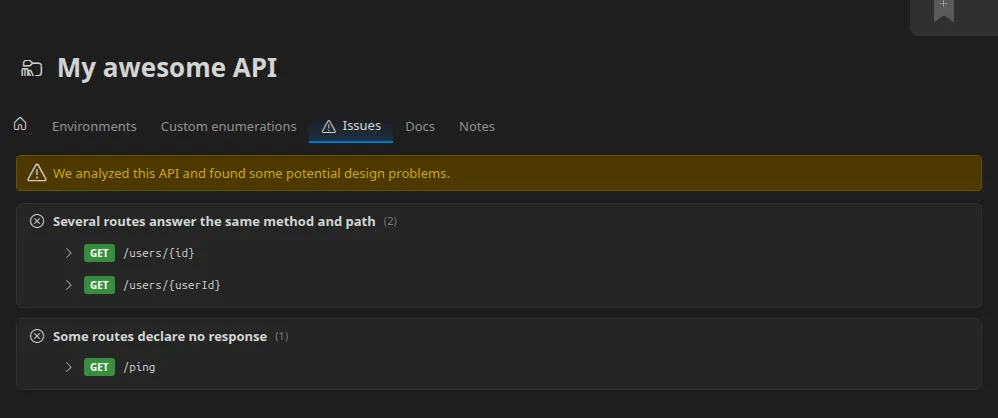
Problems are grouped by type, so twenty duplicate routes read as one line with a count rather than twenty separate entries. Under each type, Restorm lists the exact entities concerned — a route shows its HTTP verb and real path, and expands to that route’s documentation so you can see what it declares without leaving the tab.
The checks mirror the API designer’s, so the kinds of problems you may see include:
- duplicate routes — two routes that answer the same method and path;
- missing responses — a route that declares no response at all;
- reserved paths — a route that sits on a path the mock server reserves
(
/swagger.json,/graphql, …), which would never answer; - constraint problems — an invalid pattern, or a minimum above its maximum.
The list is read-only: it tells you what to fix, and you fix it at the source (re-import a corrected spec, or edit the API). It is re-computed on the events that change an API — a file open, an import, an API update — not on every keystroke.