
Request history
Every request run is recorded, whatever the protocol: HTTP, GraphQL, gRPC, SOAP, WebSocket, JSON-RPC, tRPC, SSE, AMQP, Redis, STOMP, Kafka, OData.
Opening the history
Section titled “Opening the history”The clock-shaped button in the smartbar — tooltip Request history. It opens the Response history modal, scoped to the current tab: the sidebar tree and the other tabs stay usable while you browse it.
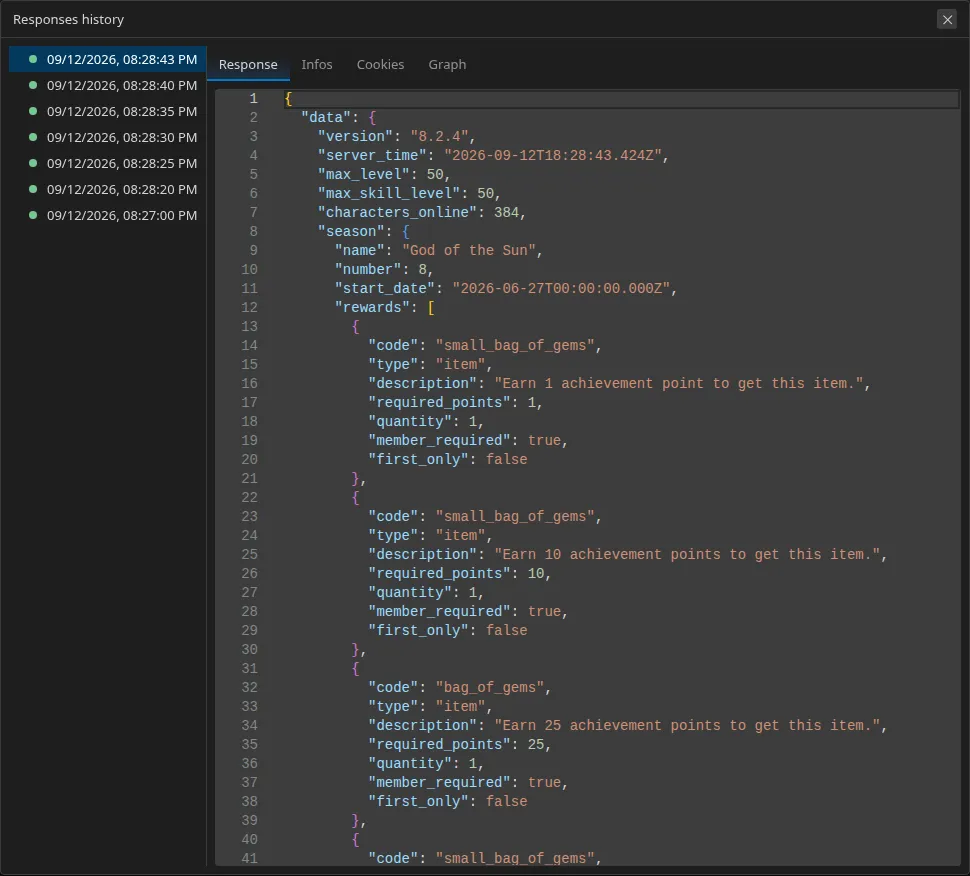
The list
Section titled “The list”Each entry carries:
- its date, in US or ISO format depending on the Behavior ▸ Date/time format setting;
- a three-state status badge: green (success), orange (redirect), red (failure);
- a pin icon if the entry is pinned.
The detail
Section titled “The detail”The rendering is identical to the live tab’s: info, headers, body in the
collapsible JSON viewer — plus one thing the live tab does not show: the
request body actually sent, reformatted (indented JSON, XML, key=value for
a form, or the path of the file that was uploaded).
That is what lets you answer “what exactly did I send, the time it worked?”.
Retention and pinning
Section titled “Retention and pinning”Restorm keeps the last ten unpinned entries per request. Beyond that, the oldest are deleted.
An entry’s context menu offers Pin / Unpin: a pinned entry survives indefinitely. Pin the reference response for a case you care about, and it will not be washed away by your subsequent attempts.
Where it is stored
Section titled “Where it is stored”In an archive placed next to the project: <project>.responses.zip. It holds
the per-request history and the scenarios’ run history.
Since that archive can contain bulky response data, it lives outside the
project file — add it to your .gitignore.
Secrets
Section titled “Secrets”Tokens produced by
authentication requests are redacted
in the stored bodies and headers. The get_response_history MCP tool goes
through the same service: an AI agent cannot retrieve a token through the
history.