
Accounts and signing in
Restorm is usable without an account: the Community edition asks for no sign-up. Signing in serves to unlock the capabilities of the Pro and Enterprise editions.
Signing in
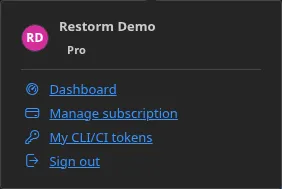
Section titled “Signing in”The Account button is on the right of the title bar. Its menu offers Sign in, then, once you are signed in, Dashboard, Upgrade to Pro or Manage my subscription, My CLI/CI tokens, and Sign out.
How signing in works
Section titled “How signing in works”Restorm opens your system browser and listens on a local port to receive the authentication callback. You therefore sign in in a real browser, with your password manager and your second factor.
The session token is stored by the operating system’s keychain, and no raw token crosses the application’s internal bridge.
Your entitlements are embodied in a signed token that carries your plan and your capabilities. It is verified offline by the application, and refreshed periodically as well as whenever the window regains focus.
That point deserves emphasis: a compromised server cannot grant capabilities it is not entitled to sign for.
Your plan, at a glance
Section titled “Your plan, at a glance”The leftmost cell of the status bar permanently shows:
Restorm v1.4.2 - CommunityIt updates immediately on signing in, signing out and refreshing entitlements.
Two roles within an organisation:
| Role | Can |
|---|---|
| admin | Manage billing, seats and members |
| member | Use the plan’s capabilities |
Buying and managing
Section titled “Buying and managing”Upgrade to Pro opens the purchase flow; Manage my subscription opens the customer portal, where you change the payment method, download invoices and manage seats.
A token for continuous integration
Section titled “A token for continuous integration”Headless execution does not sign in
interactively: it reads an organisation token from the RESTORM_TOKEN
environment variable.
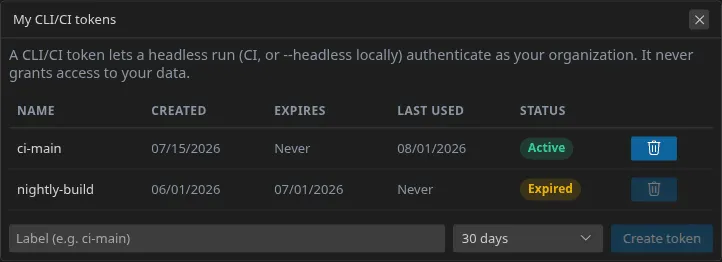
That token, prefixed rstk_, is generated from inside the app — the account button in the title bar,
then “My CLI/CI tokens” — or from your account’s dashboard. When you create it
you choose its lifetime (7 to 365 days, or no expiration); an expired token
is refused exactly like a revoked one. It is
attached to the organisation, not to a person: a colleague leaving does not
break your pipeline.
export RESTORM_TOKEN="rstk_…"restorm --open ./api.restorm --run "Tests de fumée" --headlessPut it in your CI’s secret vault, never in the repository.
A missing, invalid or revoked token makes the command exit with code 3, and an explicit message says why. See Headless execution and CI.