
Quick settings
A quick setting (quick config) is a named snapshot of a request’s configuration. You set the request up however you like, you save it under a name, and you reload that state with two clicks later on.
It is the tool for variants of the same call: Create a minimal customer, Create a full customer, Payload that triggers a 422.
What is captured
Section titled “What is captured”Every configuration field of the protocol: method, URL, headers, parameters, body, server-mode options, timeout, and so on.
What is excluded: the request’s identity (identifier, name, notes, tags, icon, import origin, deprecation status) and the authentication route. A variant therefore never changes your authentication, and reloading a variant does not rename your request.
Saving
Section titled “Saving”The Quick settings button is in the tab’s smartbar. Its popover contains:
- a Configuration name field — pre-filled if the current state already matches a saved entry;
- a Save to project file (
.restorm) switch; - the Save button;
- the Saved configurations list.
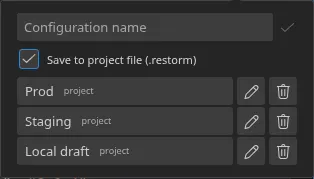
Two storage targets
Section titled “Two storage targets”| Target | Badge | Where it is written | Consequence |
|---|---|---|---|
| Project | project | In the .restorm file | The variant travels with the project: it is shared and version-controlled |
| User | user | In your local settings | The variant stays on your machine; it survives closing the project but is not shared |
Both lists are displayed merged together, each row carrying its origin badge.
Reloading
Section titled “Reloading”Click a saved configuration. Restorm asks for confirmation — “Do you want to
load the configuration “X”? Your current unsaved configuration will be lost.” —
then applies the snapshot and re-runs {{variable}} resolution.
Deleting
Section titled “Deleting”The bin icon on each row. If any scenarios reference the configuration, they are named in the confirmation before you commit to it.
Inside a scenario
Section titled “Inside a scenario”A scenario action bound to a request can designate a quick setting. The order of application is then:
- the base request;
- the quick setting (project target, designated by its identifier);
- the overrides set on the action;
- the values arriving through a link on the override port.
That is the clean way to replay the same scenario with three data sets: one action, three quick settings.
Over MCP
Section titled “Over MCP”Five tools, all available in the Community edition: list_quick_configs,
add_quick_config, update_quick_config, delete_quick_config and
describe_quick_config_schema — the last of which returns the exact list of
fields accepted for each protocol. A field foreign to the protocol is rejected
along with the list of valid fields.