
Importing OData metadata
Importing
Section titled “Importing”File ▸ Import (Ctrl+I) then:
- an
.edmxfile; - the URL of your service’s
$metadataendpoint — the most convenient route; - a CSDL JSON document (OData 4.0 / 4.01).
All three EDMX variants — v2, v3 and v4 — are recognised.
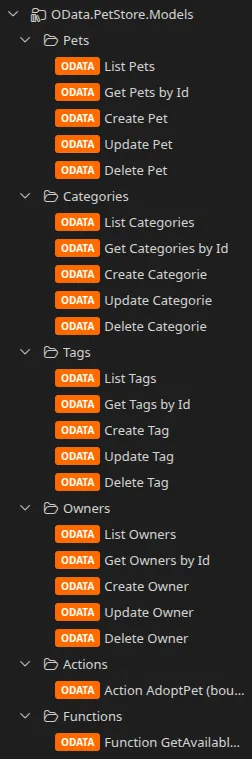
What is imported
Section titled “What is imported”| Element | What Restorm makes of it |
|---|---|
| Each entity set | A folder holding its CRUD requests |
| Actions | An Actions folder |
| Functions | A Functions folder |
| The entity type and its properties | Pre-filled on each OData request |
| Navigation properties | Pre-filled (they feed $expand) |
| Operation parameters | Typed, with their qualified CSDL type |
| Query options | $filter, $select, $top, $skip prepared in advance |
| Models | The API documentation |
The environment folder produced is tagged with the OData version detected, which then drives the requests’ behaviour.
$filter autocompletion
Section titled “$filter autocompletion”The imported metadata feeds the $filter field’s autocompletion: property names
and operators are offered as you type.
Updating
Section titled “Updating”OData is one of the re-syncable formats. See Updating from the source.