
Introduction to scenarios
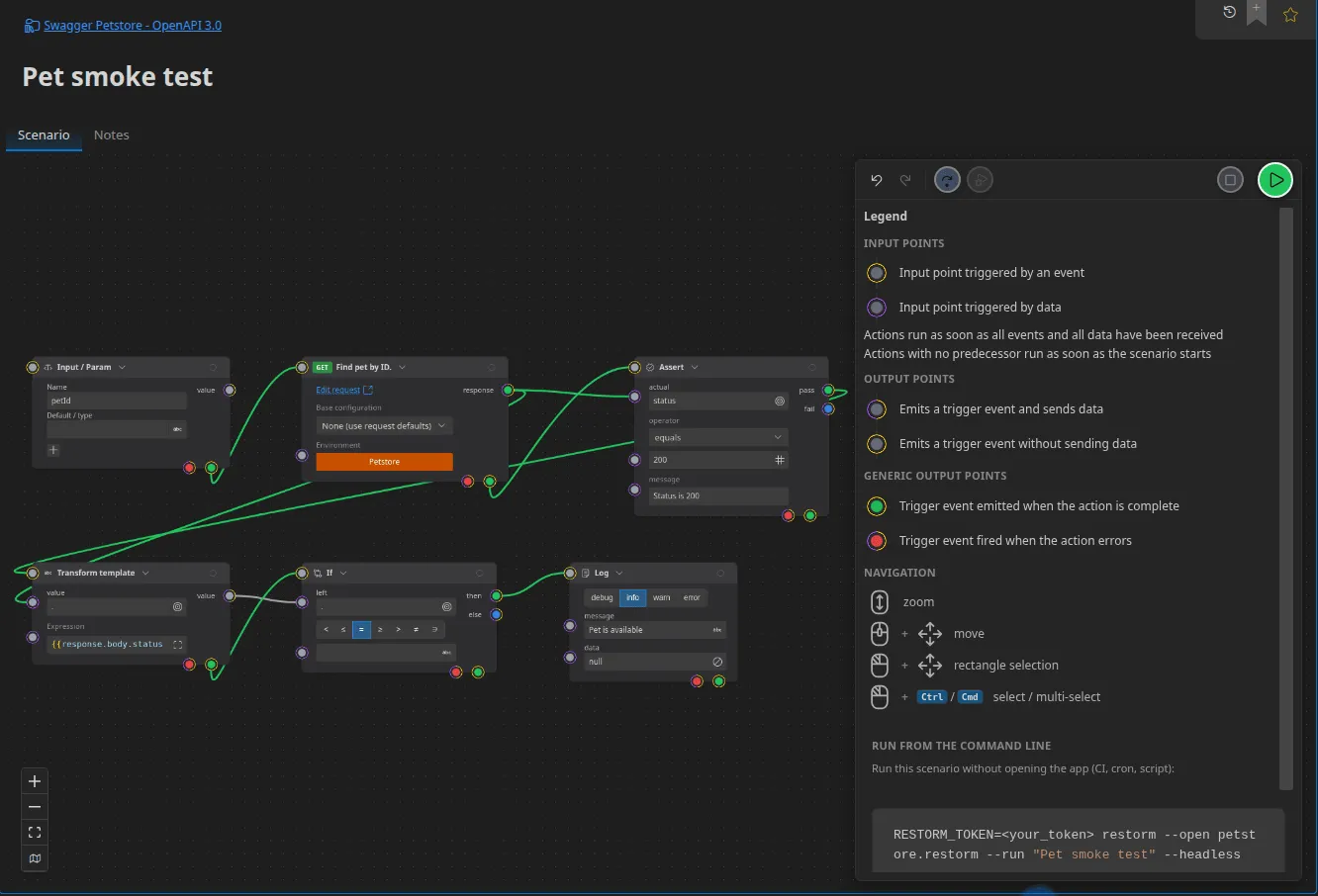
A scenario is a graph. Boxes (the actions) are joined by links that carry values and signals. The engine runs a box as soon as all of its wired inputs have received something.
In Restorm, this is what replaces the pre-request and post-request scripts of other API clients — with one decisive advantage: you can see the flow.
Right-click in the tree ▸ Add ▸ Scenario.
What it is for
Section titled “What it is for”- Chaining calls and passing a value from one to the next: create a resource, get its identifier, use it in the following call.
- Checking: assertions, JSON schema validation, comparison.
- Branching and looping:
if,switch,for,forEach,while,retry. - Orchestrating several transports: open an MQTT subscription, trigger an action over HTTP, check the message arrives.
- Automating: the same scenario runs in the interface and with no window in continuous integration.
The building blocks
Section titled “The building blocks”| Notion | What it is |
|---|---|
| Box (node) | An action. Ninety types are available — see the catalogue |
| Port | A wiring point on a box, typed and directed |
| Link (edge) | A wire between an output port and an input port |
| Selector | A path applied to the value in transit on a link (data.items[0].id) |
| Run variable | A named value, set and re-read during the run |
| Parameter | An input to the scenario, supplied at launch or on the command line |
| Output | A result exposed to the scenario’s caller |
The three ports every box has
Section titled “The three ports every box has”They are not listed in the configuration: they are part of the box’s frame.
| Port | Direction | Role |
|---|---|---|
in | Input | The trigger. It accepts several incoming links and then waits for all of them to have arrived — this is the “wait for several branches to finish” barrier |
error | Output | The failure route. Everything that goes wrong leaves this way |
done | Output | Emitted once the box and its whole downstream subgraph have finished |
The done / value-output distinction matters: a value leaves as soon as it is
produced, whereas done waits for everything that depends on it to be finished.
A first scenario
Section titled “A first scenario”- Add an HTTP Request action and bind it to an existing request.
- Add an Assert action, operator
eq. - Draw a link from the request’s
responseport to the assertion’sainput, and put the selectorstatuson that link. - In the assertion, set
bto200. - Click Play.
The assertion has two outputs, then and else: wire a Log or a Toast
onto each to watch the result go by.
What next
Section titled “What next”- Building a scenario — the editor’s gestures.
- Ports and links — the execution model in detail.
- Variables and data — how values travel.
- Action catalogue — the 90 boxes.
- Code actions — when the graph is not enough.