
Importing a HAR file
A HAR (HTTP Archive) is what your browser’s Network tab produces with “Save all as HAR”. It is the most direct way of turning “what the site does” into a Restorm project.
Importing
Section titled “Importing”In the browser: developer tools ▸ Network tab ▸ right-click ▸ Save all as
HAR. Then, in Restorm: File ▸ Import (Ctrl+I).
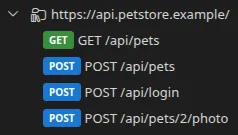
What is imported
Section titled “What is imported”| HAR element | What Restorm makes of it |
|---|---|
log.pages | One folder per page (flattened if there is only one page) |
log.entries | One HTTP request per recorded call |
| Method, URL, query parameters | Filled in |
| Headers | Carried over, except HTTP/2 pseudo-headers and a content-length that has become wrong |
| Cookies | Merged into a single Cookie header |
| Bodies | JSON, plain text, x-www-form-urlencoded, multipart/form-data |
The distinctive part: the responses too
Section titled “The distinctive part: the responses too”HAR is the only import format that also feeds the history: the responses actually recorded during the capture are written into each created request’s response history.
You therefore have, right from the import, the reference response for every call — before you have sent anything at all.