
Headless execution and continuous integration
A scenario built in the interface runs with no window from the command line. That is the route that turns your API tests into a pipeline step.
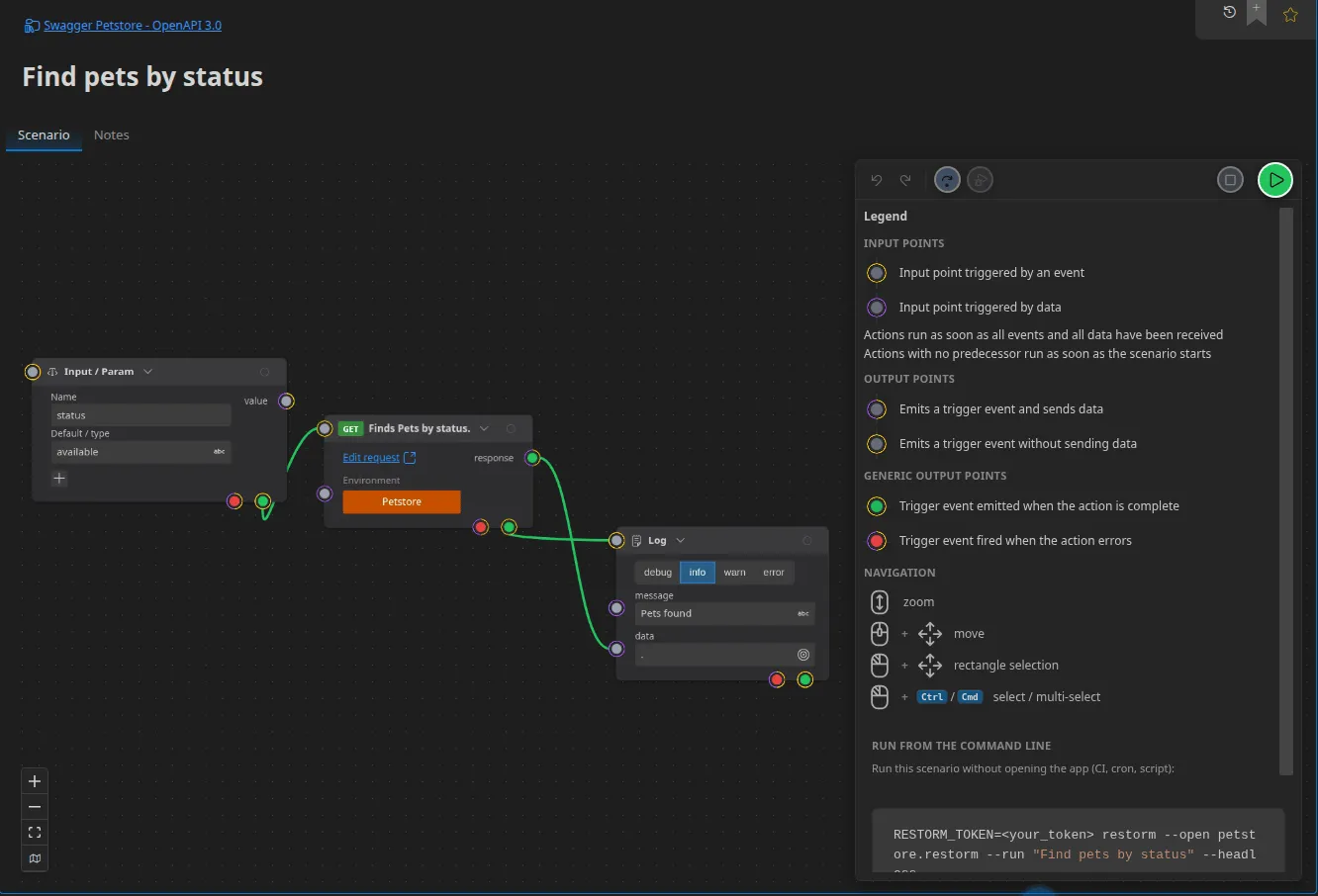
restorm \ --open ./projet.restorm \ --run "Find pets by status" \ --headless \ --param status=availableThe arguments
Section titled “The arguments”| Argument | Role |
|---|---|
--open <path>, -o | The project to open. Mandatory with --run |
--run <target> | The scenario to run. Its presence activates command-line mode |
--by <name|id> | How --run designates the scenario: by name (the default) or by identifier |
--headless | No window at all. Without it, the window appears while the log scrolls past on the console |
--param name=value | A value for a scenario input parameter (an Input / Param box). Repeatable |
--all-logs | Includes the engine’s entries; by default only the Log action’s are emitted |
--out <file> | Also writes the log to a file, as it goes |
--clear-settings, -cls | Resets the preferences before launching |
A malformed --param (with no =) is reported on the error output and ignored.
name= (an empty value) is accepted.
Values are converted according to the parameter’s declared type — see Variables and data.
Exit codes
Section titled “Exit codes”| Code | Meaning |
|---|---|
0 | The scenario finished correctly |
1 | Failure, cancellation, or an engine error |
2 | Target not found, --out file unreachable, or --run without --open |
3 | Entitlement denied: RESTORM_TOKEN missing, invalid or revoked, insufficient plan, or verification endpoint unreachable |
It is this convention that makes the result directly usable by a CI runner.
The output
Section titled “The output”The log is written to standard output, one entry at a time, as soon as it is produced, as a YAML sequence:
- message: "🔵 [2026-07-29 10:30:00.123] Commande créée" data: { id: 4271 }Levels are prefixed with a badge: ⚪ debug, 🔵 info, 🟠 warn, 🔴 error.
Lines are never wrapped — the output stays grep-able. Errors go to standard
error.
It is exactly the text the interface’s “copy the log” button produces: the same format on both sides.
Secrets in CI
Section titled “Secrets in CI”Use the environment variable secret source: the secret is injected by your CI’s vault, Restorm only reads it, and nothing is written into the project. See Secrets.
Installing Restorm on the runner
Section titled “Installing Restorm on the runner”- From npm —
npm i -g restorm-cli@<version>, thenrestorm …. The official build is downloaded once, verified against its published checksum and kept in a cache, so later jobs on the same machine download nothing. The npm package’s version number is the Restorm version it runs: pinning one pins the other. - From the system package (
.deb,.rpm), as in the examples below — the better choice when you build your own runner image, since the job then downloads nothing at all.
The official GitHub action
Section titled “The official GitHub action”On GitHub, Monsieur-Dev/restorm-action wraps everything this page describes into one step: it installs Restorm through restorm-cli (one checksum-verified download, cached between jobs), wraps it in xvfb, runs your scenario headlessly and maps each exit code onto a named job error.
- uses: Monsieur-Dev/restorm-action@v1 with: project: ./api.restorm scenario: Smoke tests params: | status=available env: RESTORM_TOKEN: ${{ secrets.RESTORM_TOKEN }}The action’s tag pins the Restorm version (@v1.2.3 runs Restorm 1.2.3), or pass an explicit version: input. All inputs are documented in the repository README. The manual recipe below remains for anyone who wants full control.
GitHub Actions
Section titled “GitHub Actions”name: Tests d'APIon: [push]
jobs: api: runs-on: ubuntu-latest steps: - uses: actions/checkout@v4
- name: Installer Restorm env: RESTORM_VERSION: '1.4.2' # the version you want to pin run: | curl -sSL -o restorm.deb \ "https://dl.restorm.app/restorm_${RESTORM_VERSION}_amd64.deb" sudo apt-get install -y ./restorm.deb
- name: Exécuter les tests de fumée env: RESTORM_TOKEN: ${{ secrets.RESTORM_TOKEN }} API_TOKEN: ${{ secrets.API_TOKEN }} run: | xvfb-run -a restorm \ --open ./api.restorm \ --run "Find pets by status" \ --headless \ --all-logs \ --out run.log \ --param status=available
- name: Publier le journal if: always() uses: actions/upload-artifact@v4 with: name: journal-restorm path: run.logGitLab CI
Section titled “GitLab CI”tests-api: image: ubuntu:24.04 variables: RESTORM_TOKEN: $RESTORM_TOKEN RESTORM_VERSION: '1.4.2' # the version you want to pin before_script: - apt-get update && apt-get install -y curl xvfb - curl -sSL -o restorm.deb "https://dl.restorm.app/restorm_${RESTORM_VERSION}_amd64.deb" - apt-get install -y ./restorm.deb script: - > xvfb-run -a restorm --open ./api.restorm --run "Find pets by status" --headless --all-logs --out run.log --param status=$PET_STATUS artifacts: when: always paths: [run.log]What changes in headless mode
Section titled “What changes in headless mode”- Toast actions do nothing; the run carries on as normal.
- Parameters cannot be asked for interactively: supply them all with
--param, or let them take their default value. - The MCP server never starts on a machine with no display, whatever the setting says.
Getting a token
Section titled “Getting a token”The RESTORM_TOKEN token (prefixed rstk_) is generated from your account’s
dashboard. It is attached to the organisation, not to a person: it is the
token you put in the CI’s vault. See
Accounts and signing in.