
Routes & CRUD
Routes are your API’s entry points. They are grouped by resource, and you can write them by hand or generate them from a model.
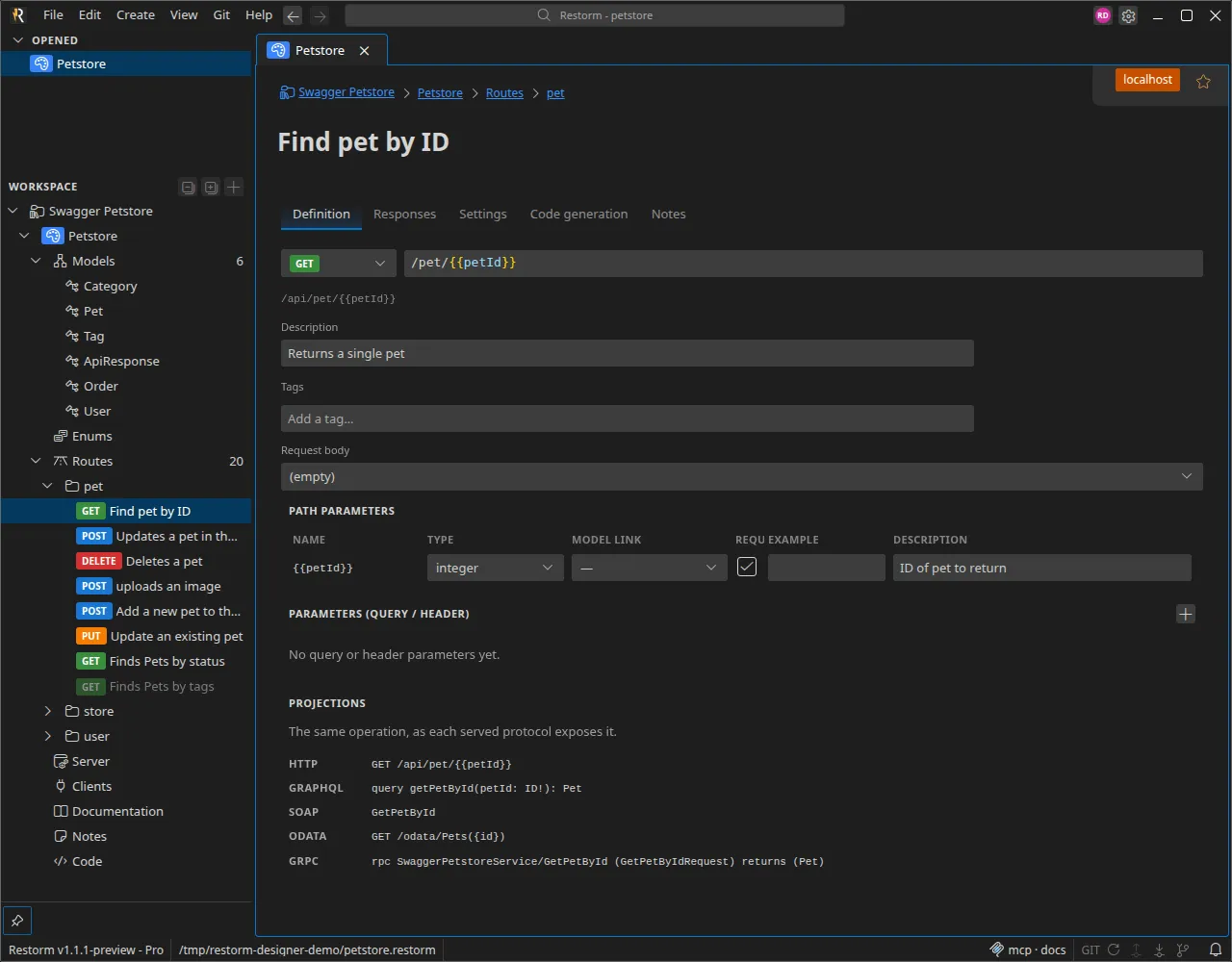
Defining a route
Section titled “Defining a route”A route carries a method, a path, parameters and responses. The
path uses Restorm’s {{param}} syntax: as soon as you type {{id}} in the
path, the corresponding parameter appears; removing it deletes it.
Parameters
Section titled “Parameters”A route’s Definition tab lists its parameters — path parameters (created
from the {{param}} placeholders) and the query / header parameters you add
with Add a parameter. Each carries a name, a location (in), whether it’s
required, a description and, optionally, an example.
The Type cell is a combo: pick a primitive (string, integer, number,
boolean) or one of the design’s named enums in a single click. For the
richer cases, choose Advanced… to open a small dialog where you can:
- make the parameter an array and choose its element type
(
array<string>, …) — a multi-value query parameter; - give it inline enum values (the allowed set, listed as chips) when it isn’t typed by a named enum;
- Extract to a named enum — promote those inline values to a shared enum (see Models & enums).
A parameter can also be linked to a model property (the Model link column), inheriting its type, or marked deprecated. Every parameter — its type, its enum, its deprecation — flows into the generated documentation and every protocol projection.
Generate CRUD
Section titled “Generate CRUD”From a model’s settings, Generate CRUD creates in one click a group of routes named after the model’s plural, with six routes:
| Route | Method & path | Responses |
|---|---|---|
| List | GET / (paginated) | 200 |
| Retrieve | GET /{{id}} | 200 · 404 |
| Create | POST / | 201 |
| Replace | PUT /{{id}} | 200 · 404 |
| Update | PATCH /{{id}} | 200 · 404 |
| Delete | DELETE /{{id}} | 204 · 404 |
The list is paginated (offset, 20 items by default, 100 at most). Each
{{id}} is automatically wired to the model’s identifier.
The Generate CRUD dialog offers two options:
- Replace existing routes — to avoid duplicates if you regenerate.
- Protect write routes with authentication — create, replace, update and delete then require a (bearer) token, while reads stay public.
It also reminds you that the CRUD is served in every protocol: REST routes, GraphQL queries and mutations, gRPC methods, OData entity set and SOAP operations (see Serving the design as a mock).
Generate search routes
Section titled “Generate search routes”For each property marked searchable, Generate search routes adds a query parameter wired to the model’s list route (and creates that route if it doesn’t exist yet).
Authentication
Section titled “Authentication”Authentication is set at three levels: a design default, a required authentication per group, and a per-route override (which inherits the group’s default). The available modes are None, Bearer (JWT), API key (header) and Basic.
Tags group routes for the documentation and the OpenAPI export. They live at two levels: a route carries its own tags (its Definition tab), and a group carries shared tags (its settings) applied to every route it holds. A route’s effective tags are the union of the two — so a tag common to a whole group is best set once on the group. When you turn an imported API into a design, a tag shared by every route of a group is automatically hoisted onto the group.
Deprecation
Section titled “Deprecation”A route (like a property or a parameter) can be marked deprecated from its
Settings. A deprecated route reads as dimmed in the Routes list and in
the generated clients, and carries a deprecation notice on its tab. The flag
travels into every protocol projection — the OpenAPI deprecated, the GraphQL
@deprecated directive, the SOAP and gRPC descriptors, and the OData
metadata — so consumers of any served protocol see it.