
Authentication
Restorm has no “authentication type” dropdown. It has something more general: the authentication request, a fully fledged request whose job is to produce headers for the others.
The upside: any scheme can be modelled, including those no dropdown ever anticipates — a two-step exchange, a signed token, an in-house API. The downside: you have to write it once.
Creating an authentication route
Section titled “Creating an authentication route”Right-click an environment folder ▸ Add ▸ HTTP authentication request.
Configure the call first, like any HTTP request: method, URL, headers, body. Then open its Configuration tab, which carries the three settings specific to authentication.
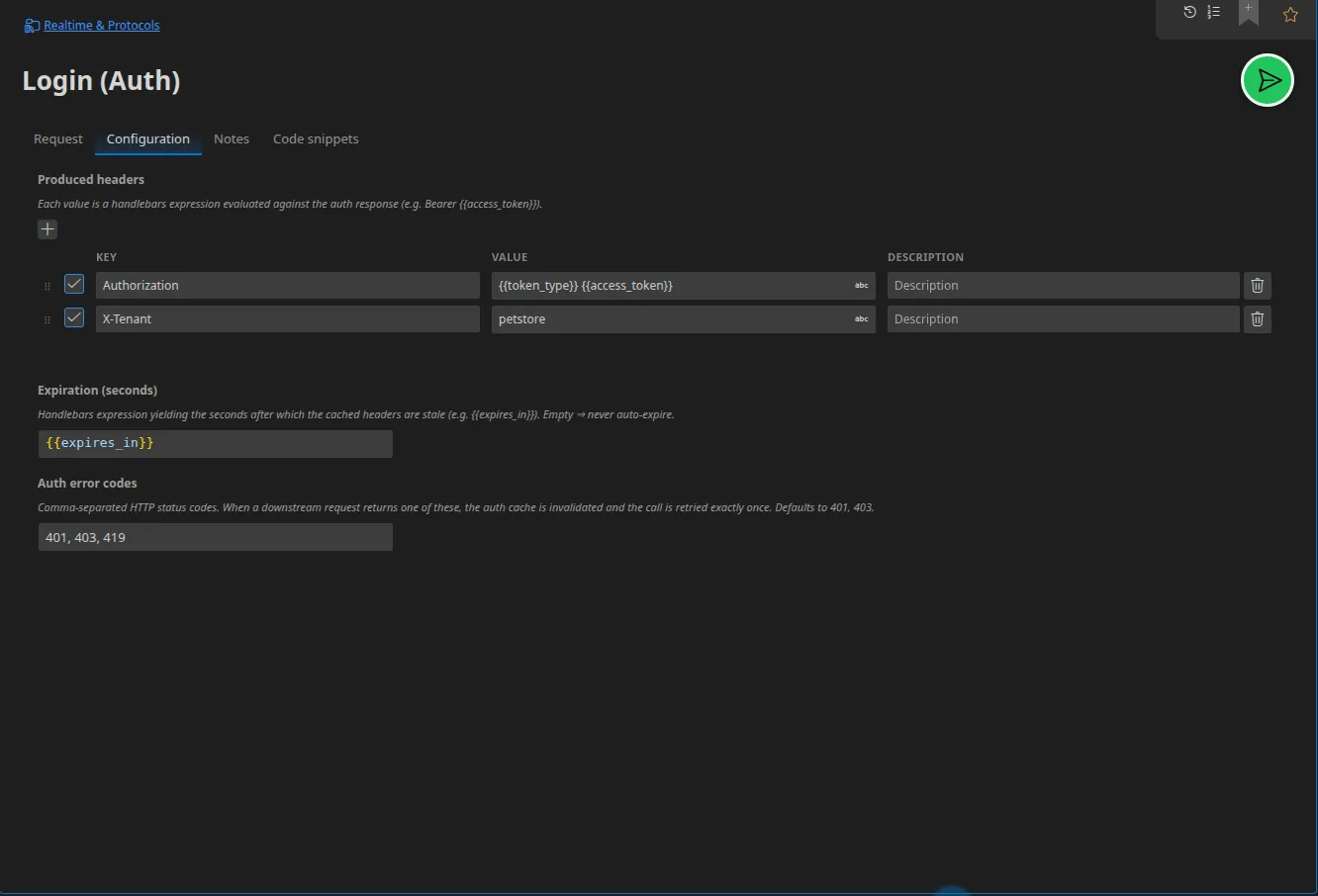
Produced headers
Section titled “Produced headers”The list of headers this route will inject into every request that references it. Each value is an expression evaluated against the response body of the authentication request.
| Header | Value |
|---|---|
Authorization | {{token_type}} {{access_token}} |
Expiry (seconds)
Section titled “Expiry (seconds)”An expression, also evaluated against the response body, that gives the validity
period in seconds — typically {{expires_in}}. Left empty, the token never
expires by itself.
Authentication error codes
Section titled “Authentication error codes”The HTTP statuses which, when received by a request using this route, trigger a
token renewal followed by an automatic retry. By default: 401 and 403.
Two terms, one thing
Section titled “Two terms, one thing”An authentication request is the item you create in the tree. An authentication route is that same item seen from another request, in the picker that attaches it. Both terms name the same entity, in two places in the interface.
Attaching a route to a request
Section titled “Attaching a route to a request”On the request’s tab, in the smartbar, an Authentication route picker lists the environment folder’s routes. The default label is No authentication.
Once attached, the produced headers are injected on every send, the token is
cached until it expires, and a 401 causes a transparent renewal.
Common recipes
Section titled “Common recipes”Bearer / OAuth 2 client credentials
Section titled “Bearer / OAuth 2 client credentials”Request: POST https://auth.exemple.test/oauth/token, body
x-www-form-urlencoded with grant_type=client_credentials,
client_id={{clientId}}, client_secret={{clientSecret}} (the secret being a
Secret-typed value).
Produced header: Authorization = {{token_type}} {{access_token}}.
Expiry: {{expires_in}}.
No request is needed if you already have the credentials: just set the header on the request (or on the folder):
Authorization = Basic {{base64Encode (append (append user ":") password)}}
API key
Section titled “API key”A header or a query parameter is enough: X-API-Key = {{apiKey}}, with the key
held in a Secret-typed variable.
Token obtained in two calls
Section titled “Token obtained in two calls”Create a scenario: first call, extract the
intermediate code, second call, then Set variable to place the token in the run
variables. The scenario’s later requests read it with {{token}}.
What the import does
Section titled “What the import does”When a specification is imported, the security schemes it declares are translated into pre-wired headers or parameters, with an environment variable created for you:
| Scheme in the specification | What Restorm sets up |
|---|---|
apiKey (header or query) | A pair named after the scheme, value {{<schema>}} |
http / basic | Authorization: Basic {{<schema>_credentials}} |
http / bearer, oauth2, openIdConnect | Authorization: Bearer {{<schema>_token}} |
All that is left is to fill in the variable, or to replace it with an authentication route if you want automatic renewal.
Native per-protocol credentials
Section titled “Native per-protocol credentials”Some protocols do not go through HTTP headers. Their credentials are fields on the request itself:
| Protocol | Fields |
|---|---|
| MQTT | username, password, client identifier |
| AMQP | username, password, vhost |
| Redis | password |
| Kafka | SASL mechanism (plain, scram-sha-256, scram-sha-512), identifier, password, TLS |
| STOMP | The CONNECT frame’s login and passcode headers |
| gRPC | Call metadata |
Every one of those passwords accepts a Secret-typed value.