
Favorites
A favourite is a request pinned at the top of the sidebar tree. On an imported project holding three hundred operations, this is what brings you back in one click to the five you actually use.
Adding a favourite
Section titled “Adding a favourite”Three entry points:
- the star at the far right of the tab’s smartbar;
- the sidebar tree’s context menu — Add to favorites / Remove from favorites;
- the File ▸ Favorites menu.
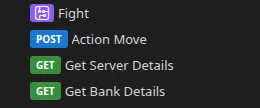
The Favorites pane
Section titled “The Favorites pane”It only appears at the top of the sidebar tree once you have at least one favourite. Entries are reordered by drag and drop.
Favorites also appear on the welcome screen (Favorites card) and in the File ▸ Favorites submenu.
Favorites are attached to the project, not to the file path: they are indexed
by the project’s internal identifier. Renaming or moving your .restorm file does
not lose them.
They are, however, local to your machine: they are not written into the project file and therefore not shared with your team. That is deliberate — your favorites are your own work plan, not the project’s.
Over MCP
Section titled “Over MCP”list_favorites and set_favorite, both available in the Community edition.