
Importing a Postman collection
Restorm imports Postman v2.0 and v2.1 collections (the format produced by “Export ▸ Collection v2.1” in Postman).
Importing
Section titled “Importing”File ▸ Import (Ctrl+I) then the exported .json file.
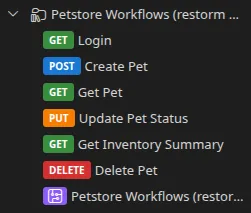
What is imported
Section titled “What is imported”| Postman element | What Restorm makes of it |
|---|---|
Folders (nested items) | Folders, at the same depth |
| Requests | HTTP requests — or GraphQL ones when the body is of graphql type |
raw, formdata, urlencoded, file, graphql bodies | The matching body type |
| Collection variables | An environment’s variables |
| Descriptions | The request’s notes and the API documentation |
| Sample responses | The API documentation |
Scripts
Section titled “Scripts”This is the part that sets this import apart. Your pre-request and test scripts are not lost: they are kept in the documentation and converted into a runnable scenario whose code boxes run the script as it is.
For that, Restorm provides a pm.* compatibility layer in its
JavaScript code actions:
pm.environment, pm.variables, pm.response, pm.test, pm.expect,
pm.sendRequest, pm.setNextRequest, pm.cookies… Your assertions therefore
keep working with no rewriting.
Authentication
Section titled “Authentication”Postman’s authentication blocks (oauth2, apikey, bearer, basic, digest,
hawk, aws, ntlm, edgegrid) are read and summarised in the API
documentation, with sensitive values masked.
They are not converted into executable credentials: recreate an authentication route — it takes five minutes, and you gain automatic token renewal.
Updating
Section titled “Updating”Postman is one of the re-syncable formats (if the collection was imported from a URL): the folder’s Refresh button fetches the source and Restorm applies the delta. See Updating from the source.
Going further
Section titled “Going further”The Migrating from Postman guide walks through the complete migration, including environments and runners.