
Driving Restorm over MCP
Restorm exposes an MCP server (Model Context Protocol). An AI agent — Claude Code, Cursor, or any MCP client — can therefore read your project, create and run requests, and drive the interface.
That is what lets you say “import this Swagger, build a scenario that tests the ordering journey and run it” and get a verifiable result, in an application you keep in front of you.
Enabling it
Section titled “Enabling it”The server is on by default. Two governing factors:
- the Settings ▸ MCP ▸ Enable the MCP server setting;
- an absolute rule: on a machine with no display, the MCP server never starts, whatever the setting says. A CI server therefore does not end up exposing an endpoint.
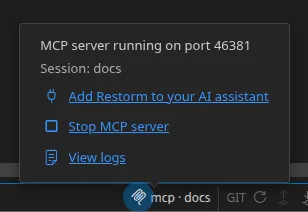
The status bar’s MCP indicator blinks on every inbound call. Its popover lets you suspend or resume the server for the session, and open the MCP logs.
Connecting your AI assistant
Section titled “Connecting your AI assistant”At start-up, Restorm picks a free port, generates a process-specific access
token, and writes a discovery file into the system’s temporary directory. The
JSON-RPC server listens on 127.0.0.1:<port>/mcp — on the loopback interface
only: any external caller gets a 403.
You never copy that port or token yourself. A small launcher bridges your MCP
client’s standard input/output and Restorm’s HTTP server: it finds the running
instance, injects the token, and forwards your calls. It answers initialize and
tools/list instantly from a built-in manifest, so your client starts fast
without waiting for Restorm to boot — then serves the live tool list once a call
goes through. It never starts Restorm silently: an instance whose MCP server
you switched off stays off, with a clear error.
The easiest way — from the app
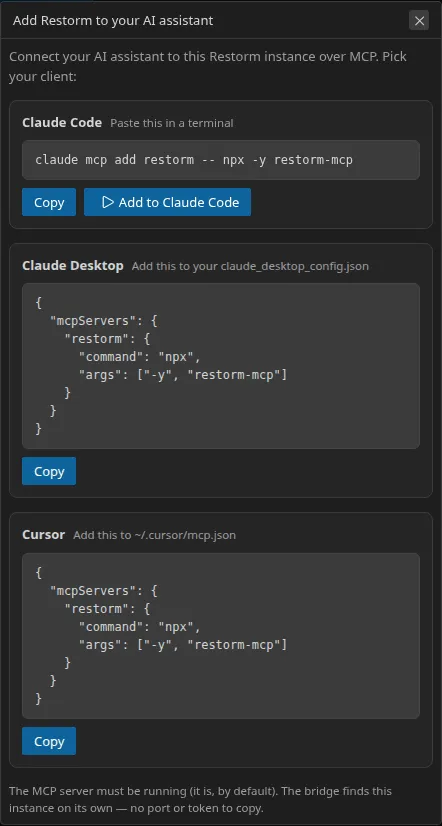
Section titled “The easiest way — from the app”The fastest route needs no manual configuration. Open the MCP indicator popover (status bar) and click “Add Restorm to your AI assistant”. A dialog lays out, client by client, the one line to copy:
- Claude Code — the
claude mcp add …command, paired with an “Add to Claude Code” button that runs it for you when theclaudeCLI is detected on your PATH; - Claude Desktop and Cursor — the
mcpServersblock to paste, with the location of the config file.
Restorm never writes another app’s config file: the run button only drives
your own claude CLI. For the other clients, you paste the snippet yourself.
The Claude Code plugin
Section titled “The Claude Code plugin”Claude Code can also install Restorm as a plugin, from our self-hosted marketplace:
/plugin marketplace add Monsieur-Dev/restorm/plugin install restorm@restorm-marketplaceThe plugin registers the restorm MCP server (it relies on npx -y restorm-mcp) — nothing else to set up.
Configuring it by hand
Section titled “Configuring it by hand”Prefer to write the configuration yourself — or using another client? The options below cover every case.
Prerequisites
Section titled “Prerequisites”- The MCP server is enabled — it is on by default (Settings ▸ MCP). On a machine with no display it never starts, whatever the setting says.
- A Restorm instance is running — the launcher connects to your running app, it does not spawn one.
- Node.js ≥ 18 for the
npxmethod below.
Option A — npx restorm-mcp (recommended)
Section titled “Option A — npx restorm-mcp (recommended)”No install, no path to manage, works with any client and on every OS. Point your client at it:
{ "mcpServers": { "restorm": { "command": "npx", "args": ["-y", "restorm-mcp"] } }}Where that snippet goes depends on your client:
- Claude Desktop — Settings ▸ Developer ▸ Edit Config, or the
claude_desktop_config.jsonfile (macOS:~/Library/Application Support/Claude/, Windows:%APPDATA%\Claude\). - Cursor — Settings ▸ MCP ▸ Add, or
~/.cursor/mcp.json. - Claude Code —
claude mcp add restorm -- npx -y restorm-mcp, or an.mcp.jsonin your project.
Option B — the launcher bundled in the app (no npm)
Section titled “Option B — the launcher bundled in the app (no npm)”Every Restorm install ships the same launcher as a bundled resource, so you can
point node straight at it without npm:
{ "mcpServers": { "restorm": { "command": "node", "args": ["<path-to>/restorm-resources/mcp-launcher.mjs"] } }}<path-to> is the app’s resources directory:
- macOS —
/Applications/Restorm.app/Contents/Resources/restorm-resources/mcp-launcher.mjs - Windows —
%LOCALAPPDATA%\Programs\restorm\resources\restorm-resources\mcp-launcher.mjs - Linux —
/opt/Restorm/resources/restorm-resources/mcp-launcher.mjs(.deb/.rpm); inside the mounted image for an AppImage;$SNAP/resources/restorm-resources/mcp-launcher.mjsfor the Snap.
Option C — direct HTTP
Section titled “Option C — direct HTTP”Read the port and the token from the discovery file, then send your JSON-RPC
requests with an Authorization: Bearer <token> header.
Where the launcher looks
Section titled “Where the launcher looks”The launcher and the app must agree on the discovery directory. Both default
to restorm-mcp under the system temp directory; if you set the RESTORM_MCP_DIR
environment variable, set it to the same value on both sides (needed only if
Restorm runs under a service manager with a different temp directory).
Several instances
Section titled “Several instances”Several Restorm processes can run in parallel. Every call accepts a reserved
__session key to designate the instance targeted. The list-instances,
create_instance and terminate_instance tools complete the picture.
The tool families
Section titled “The tool families”Reading · navigation · project · writing · environments and secrets · import · execution · scenarios · instances · interface automation (screenshot, DOM query, input, shortcuts, themes, layout).
Four resources are exposed as well: restorm://project, restorm://tree,
restorm://active-tab and restorm://request/{id}.
Full inventory: MCP tools.
What is free and what is Pro
Section titled “What is free and what is Pro”The MCP server itself is never restricted. Each tool checks its own capability at call time.
- Community edition — all request driving: run, cancel, read responses and history, read streams, send messages, import from a URL, open and close tabs, manage projects, write to the tree, manage environments and variables, quick settings, favorites, and the six firewall tools.
- Pro edition — the scenarios domain (reading included), screenshots, all of interface automation, themes, the mini browser, the workbench layout, multiple instances, and the git tools.
A restricted tool stays listed — its title carries the (Restorm Pro) suffix —
and returns an explicit, machine-readable error rather than disappearing.
Security
Section titled “Security”- Loopback and token: the server only listens on
127.0.0.1, and the token is compared in constant time. - Secrets: an agent receives a secret’s resolved value, just like the rest of the application — it drives Restorm on your behalf, with your own secrets. What the Secret type guarantees still holds: the value goes neither into the project, nor into an export, nor out to an unauthorised third-party service.
- Real network effects:
run_requestgenuinely calls the target. It is your MCP client’s approval flow that acts as the safeguard — keep it on. - The firewall applies: a call fired by an agent to an unknown origin raises the same authorisation prompt as one of yours.
- Logging: every call appears in the MCP logs, with its request and its response.